Unifi USG3 <-> Opnsense IPSec Site-to-Site VPN
By David
Intro
I needed to set up a set of VPNs from my home network to my Azure environments, which run OPNsense VNAs as firewalls. My home firewall, Ubiquiti USG-3, offers two options for s2s vpn, OpenVPN and IPSec. I’m far more familiar with IPSec, so that is what I chose.
My USG-3 is managed by a CloudKey Gen2+ controller. While this makes the initial setup of an IPSec VPN pretty easy, it gives us a LOT less visibility into what’s going on, as well as far fewer settings and customization than what the USG-3 itself is capable of.
First, I deployed my OPNsense VMs into azure using this template: https://github.com/dmauser/opnazure.
After getting my OPNsense VMs up and running, the next step was to configure the VPNs themselves. OPNsense and USG3 both support policy based and route based VPNs, but route based are far more flexible and useful for my future purposes, so that’s what I’ve selected.
Unifi Configuration
From the Unifi controller, log in and open the Settings -> VPN page.
Select the Site-to-Site VPN tab. Click Create New.
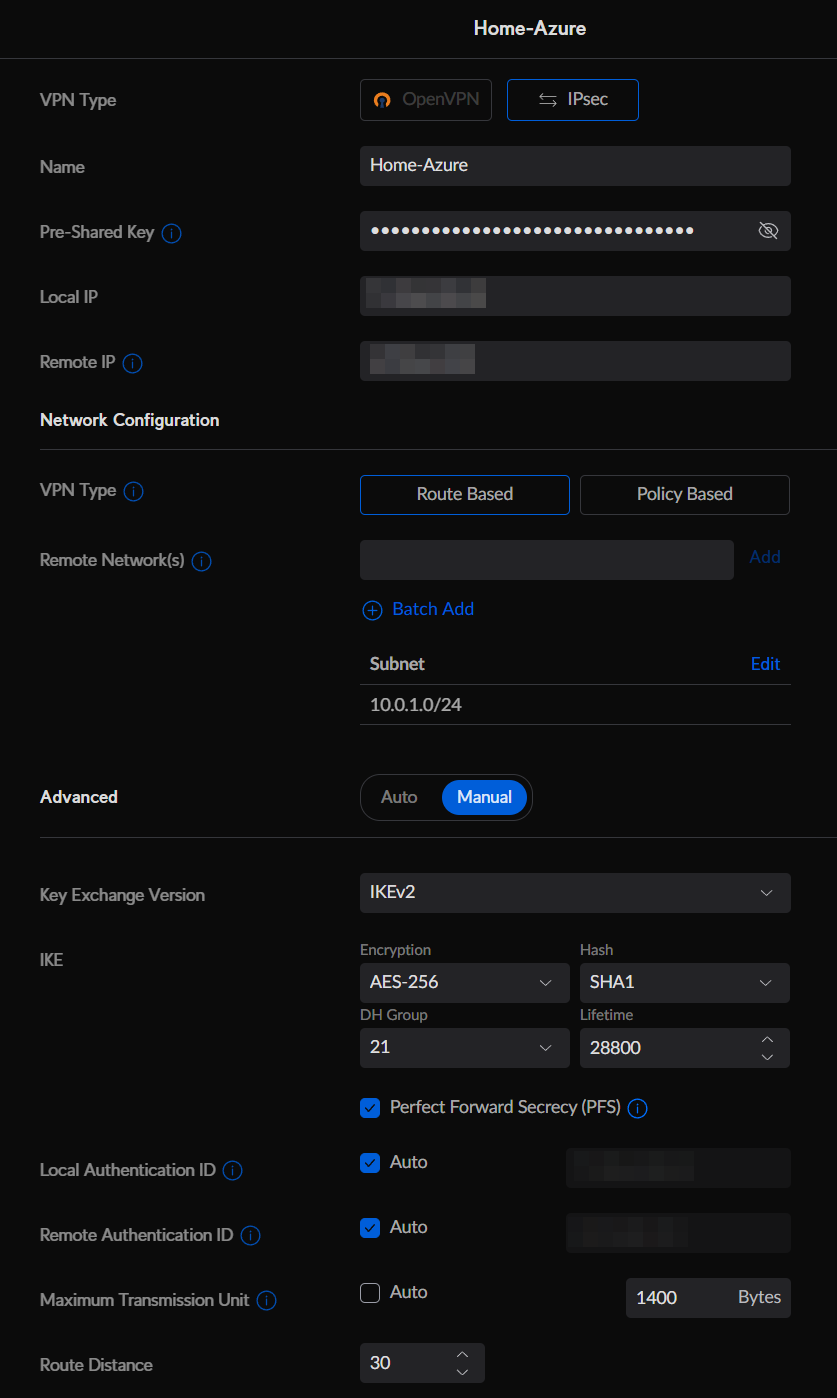
Ensure That IPsec is selected in the VPN Type. Give your VPN connection a name, and fill out the following items
Ubiquiti IPSec settings:
- Local IP: The USG-3’s public IP address
- Remote IP: The OPNsense firewall’s public IP address
- VPN Type: Route Based
- Remote Networks: Any network behind the OPNsense firewall. I used the Trusted-Subnet created by the OPNsense deployment.
- Key Exchange Version: IKEv2
- Encryption: AES-256
- Hash: SHA1
- DH Group: 14 (it doesn’t matter what you put here, the controller always sets DH14 anyways)
- Lifetime: 28800
- PFS: Checked
- Local Auth ID: Auto
- Remote Auth ID: Auto
- MTU: 1400 (You can set this to whatever MTU you want, but I’m using 1400 for future OSPF work)
Click Add.
Go to the Settings -> Routing page.
Click Create Entry. Fill out with the following settings:
- Name: Route to {Destination Name}
- Distance: 10
- Destination Network: {The same as the Remote Network from the previous step}
- Type: Interface
- Interface: {Name of the VPN connection from the previous step}
Click Add.

OPNSense Configuration
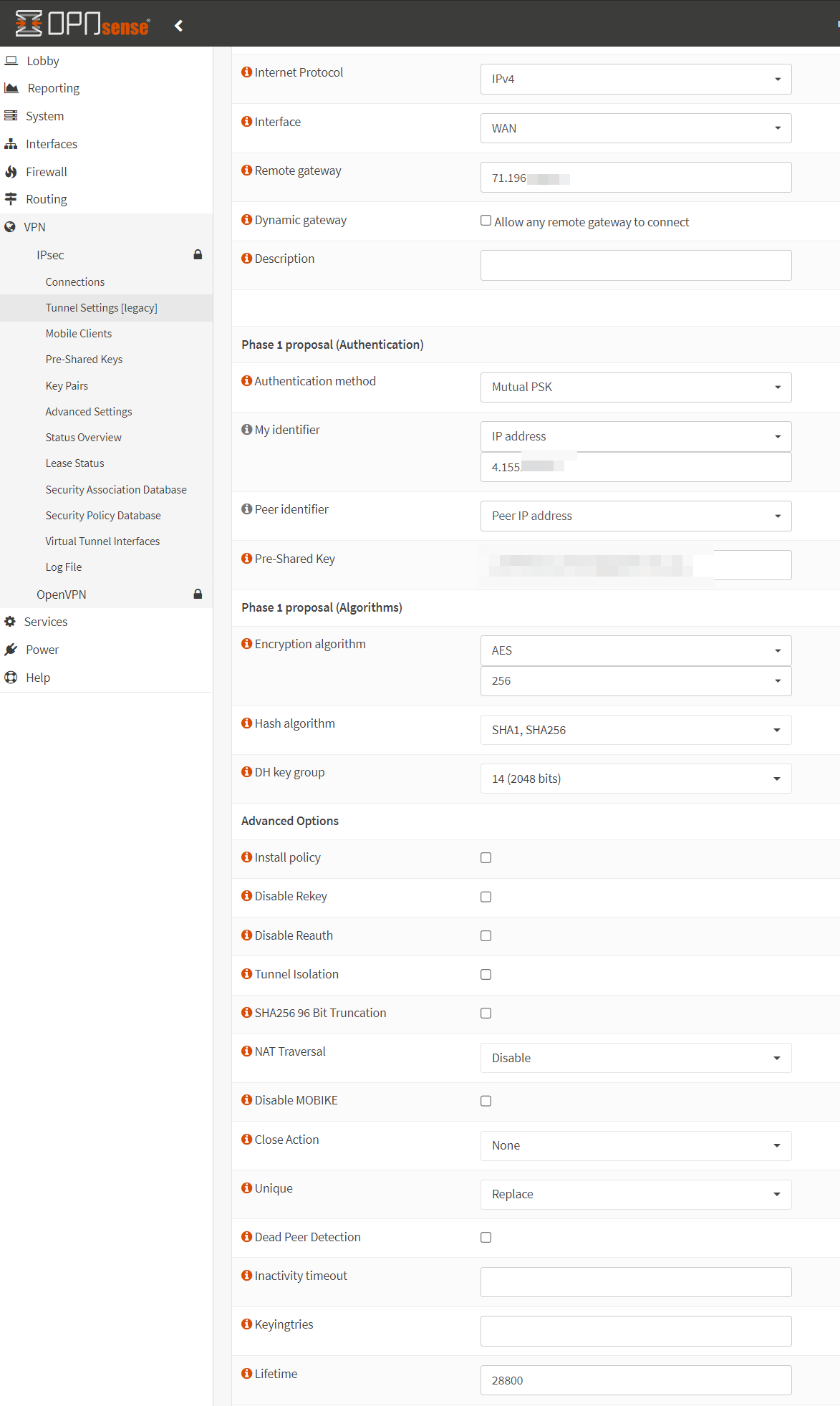
Once logged into OPNsense, browse to VPN -> IPsec -> Tunnel Settings. Click the + under Phase 1 to create a new Phase 1 Entry. Use the following settings:
- Interface: WAN
- Remote Gateway: {Public IP of USG3}
- Dynamic Gateway: Unchecked
- Authentication method: Mutual PSK
- My identifier: IP Address (enter the public IP address of the OPNsense FW)
- Pre-Shared Key: Enter the PSK set in the Unifi configuration
- Encryption Algorithm: AES-256 (NOT 256-bit AES-GCM)
- Hash Algorithm: SHA1
- DH key group: 14
- Install policy: unchecked
- NAT Traversal: enable if your USG is behind NAT, otherwise leave disabled.
- Lifetime: 28800
Click save.
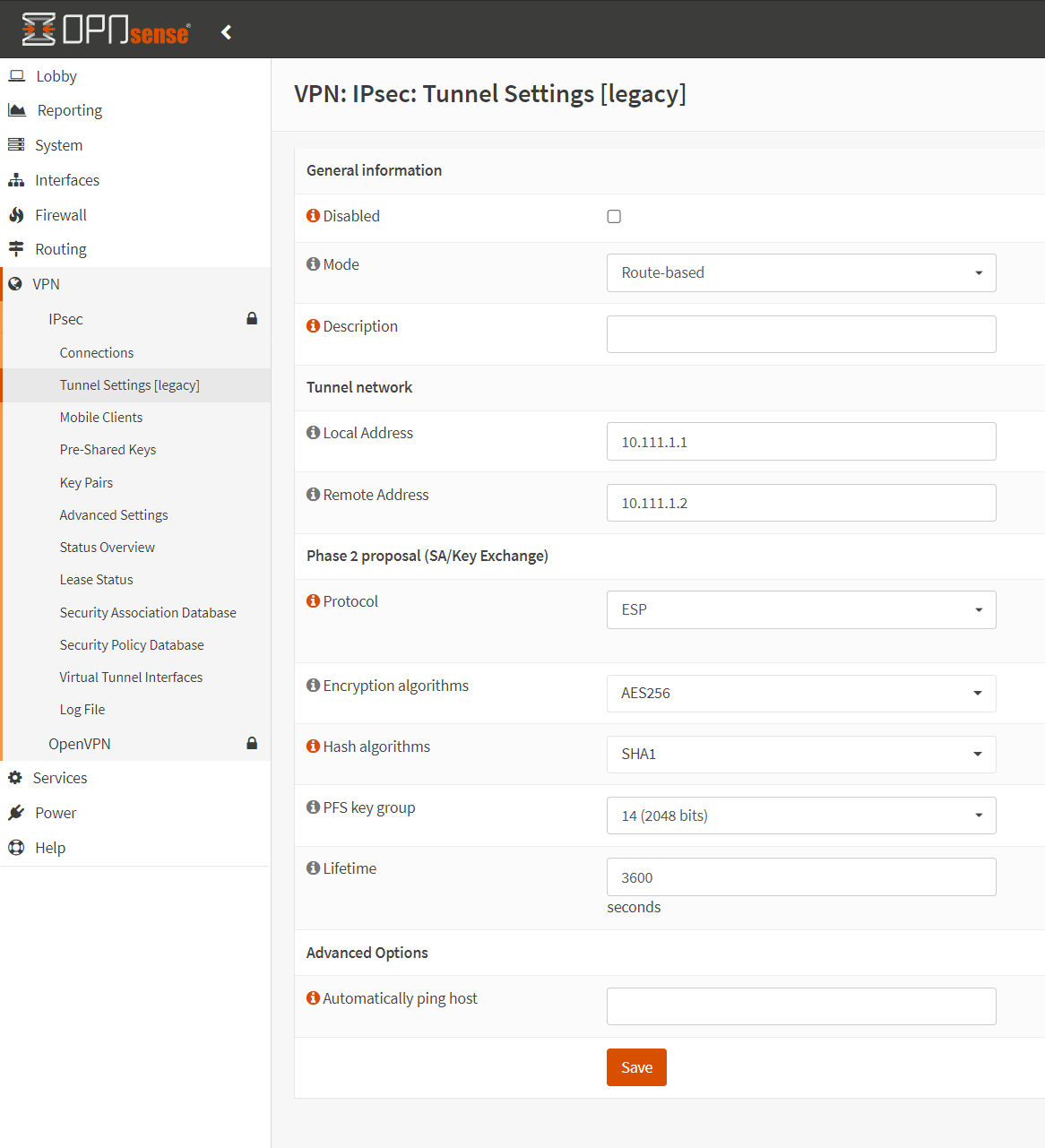
Click the + next to the newly created Phase 1 entry to create a Phase 2 entry. Use the following settings:
- Mode: Route-based
- Local Address: 10.111.1.1 (address1 in a /30 used for this VTI)
- Remote Address: 10.111.1.2 (address2 in a /30 used for this VTI)
- Protocol: ESP
- Encryption algorithms: AES256
- Hash algorithms: SHA1
- PFS key group: 14
- Lifetime: 3600
Click save.
Check Enable IPsec at the bottom of the page. Click Apply Configuration at the top.
Navigate to System -> Gateways -> Single.
Click the + to create a new Gateway.
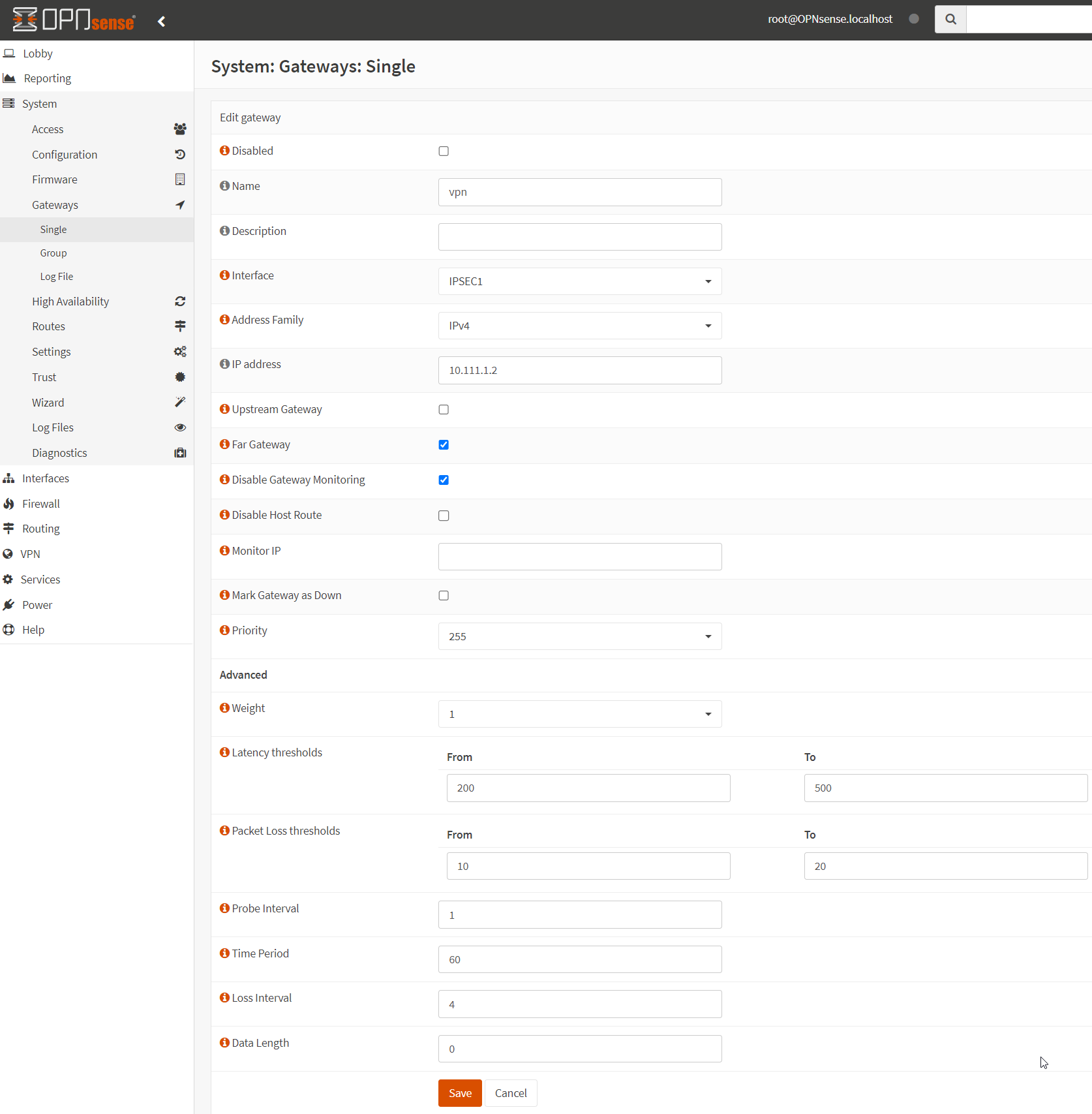
Give the new gateway a descriptive name, and use the following settings:
- Interface: IPSEC1
- IP Address: {Remote Address from the previous step}
- Far Gateway: Enabled
Click Save. Click Apply Configuration.
Navigate to System -> Routes -> Configuration
Click the + to create a new static route.
- Network Address: {Subnet behind the USG-3 we want to route to}
- Gateway: {Gateway created in the previous step}
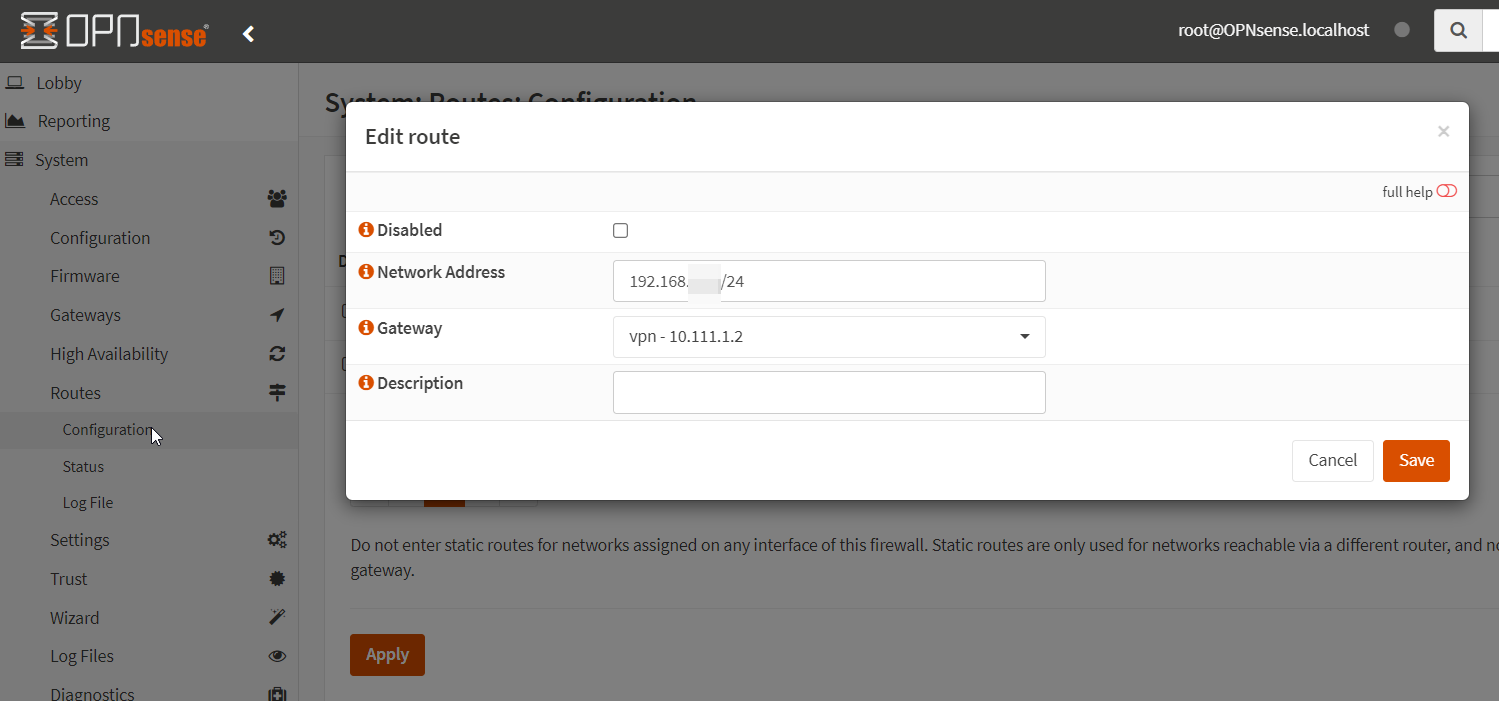
Click Save. Click Apply.
You MIGHT have to create a new firewall rule from Firewall -> Rules -> IPsec to allow inbound traffic to the LAN net.
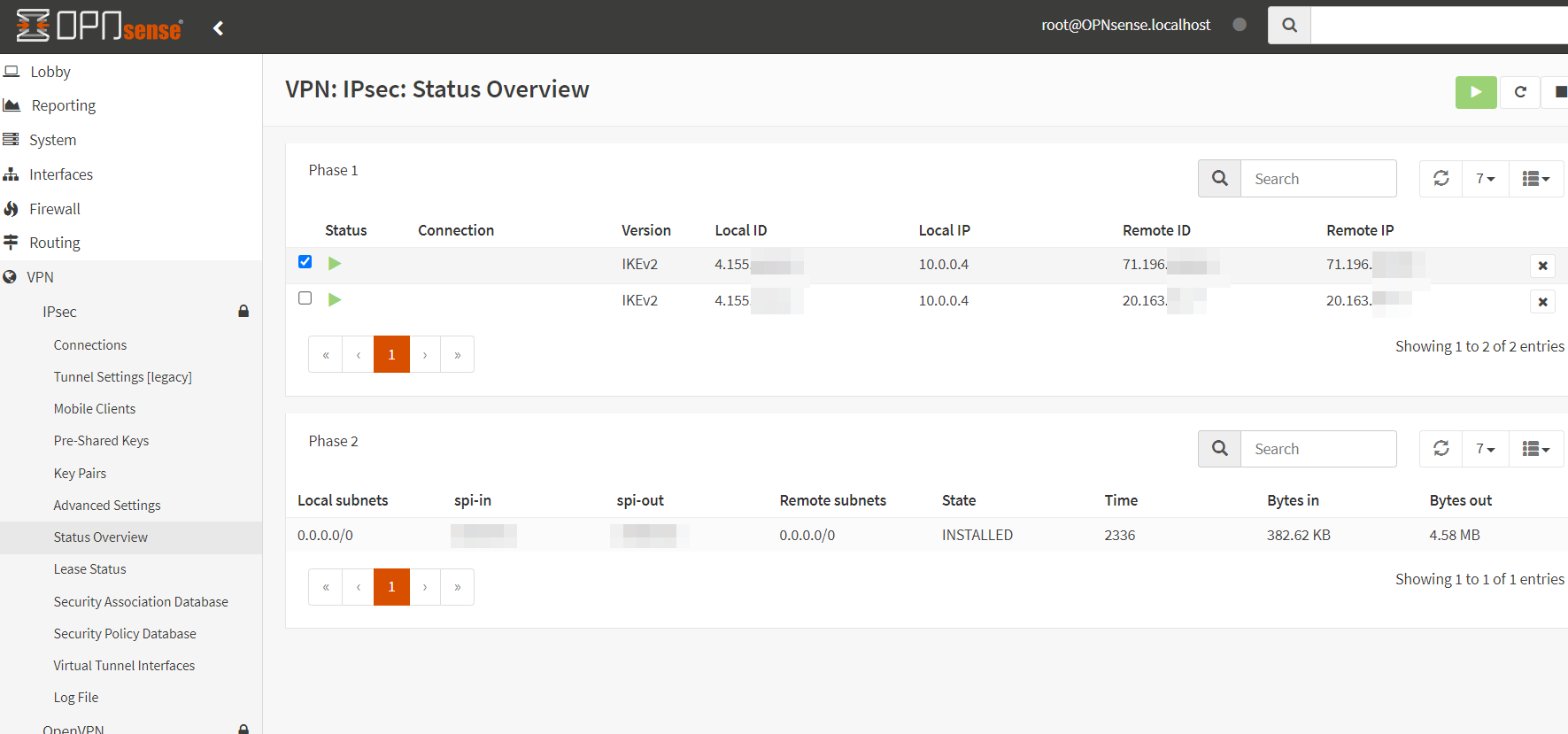
In VPN -> IPsec -> Status Overview, you should now see your Phase 1 and Phase 2 connections up with the remote subnets as 0.0.0.0/0 (scoping is done through routes and firewall).
To check the status on the USG-3 side, you have to ssh in and run “show vpn ipsec sa”.
Conclusion
At this point, we should have a site-to-site IPsec VPN connection. From here, you can create a Route Table in Azure to make sure connections from the Trusted-Subnet are going through the OPNsense VNA.